Showing posts with label C#. Show all posts

Friday, April 24, 2020

Iterate two arrays simultaneously with one foreach statement in C#


Let’s say that you have two lists or two arrays that you wish to combine.  One has a list of first names, the other a list of last names.  The list items are in the correct order so that the first name would match the last name for a given ordinal number.  But the lists may not have the same lengths (i.e. one list is not as complete as the other).  We wish to match all of the available first and last names until we run out of matching pairs.

So, what do we do?

For two arrays, we could use a “for int” loop.  We could get the size of each array by calling its Length property. And then we can compare which length is smaller; and use that number as our loop’s upper boundary.  We could then use the indexer to refer to each element in turn.  But this solution is rather inelegant.

For two lists, we should not use a “for int” loop, since lists do not have the concept of indexers.  We cannot refer to individual elements of the list via an index.  We can instead use a “foreach” loop.  But how do you refer to corresponding elements from 2 lists with each loop iteration?

This is where the Linq’s Zip method comes in very handy.  With the Zip method, we can apply a specific function to the corresponding elements of two sequences and produce a sequence of the results.

Using the above scenario as an example, where we have 5 first names but only 4 last names, we can write the following code:
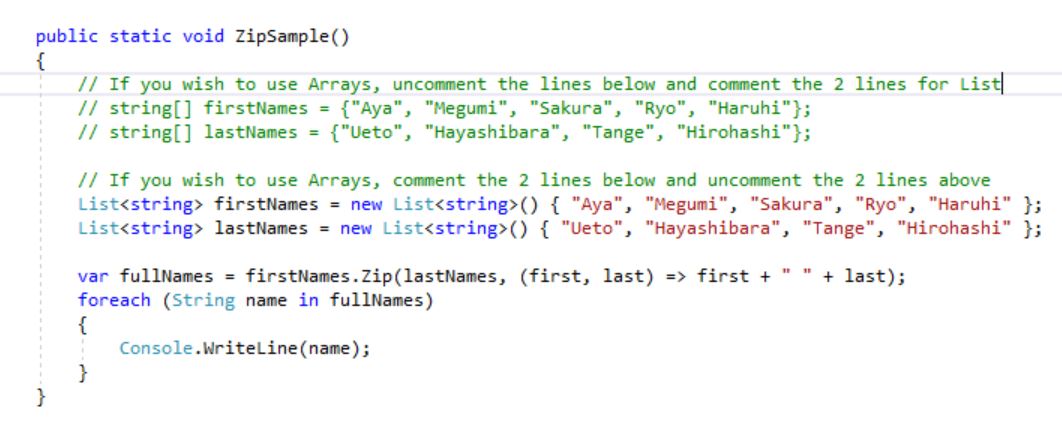

The Output is below.

You will notice that the Zip function stopped after its 4th iteration.  In this way, we don’t have any incomplete names.

That’s it for now.  I hope this tip has been super helpful.


Thursday, December 10, 2015

Word.Application.Documents.Open returns a Null


Okay, so you have embarked on a project that requires dynamically generating Microsoft Office Word documents based on a template Word document. 

Naturally you have already added a Reference to the "Microsoft Word Object Library" to your project, by right-clicking on your project, Adding Reference / COM / Type Libraries / Microsoft Word Object Library.
I have the 15.0 version of the Word object library for my project.

You have written the appropriate C# server-side code to open the document, by using the "Documents.Open" method of the Word.Application object.


Everything works in your local development environment.  Hurray for you!
But hold on. 

While everything works in your machine, it fails in the web server you deployed your application to.
You get the error message:
    An exception of type 'System.NullReferenceException' occurred but was not handled in user code.
    Additional information: Object reference not set to an instance of an object.

How can that be?

The answer is that Word failed to open the document because you did not have the proper permissions to do so.
Or rather, the user account which tried to open the Word document did not have appropriate access rights.

Below is the unintuitive solution for you.
Open the Component Services module from the Start Menu, or search for it.
You can manually start it from "C:\Windows\System32\comexp.msc"


In the Component Services window, expand the nodes to Console Root / Component Services / Computers / My Computer / DCOM Config


Under DCOM Config, scroll down to find "Microsoft Word 97 - 2003 Document" or its equivalent in your server.


Right-click on "Microsoft Word 97 - 2003 Document", select Properties / Identity.


In the Identity tab, change the option control selection from "The launching user" to "The interactive user".

Hit OK and Exit. 

And voila! 
Your frustrating error goes away, and your application magically works as you expected in your web server.